
Qianwen Spreadsheet Agent Launch: Generate Excel files directly from conversations and deliver the finished product in 1 minute

Ali Qianwen launched the Spreadsheet Agent today, which supports generating and editing Excel files directly through natural language conversation. The system can produce professional spreadsheets with formulas and formatting within 1–2 minutes, without the need for secondary copy-pasting, and supports multimodal input and online editing.
Qwen Form Agent Launch: Generate Excel Directly from Conversations, Deliver Results in 1 Minute
Alibaba’s Qwen has officially launched the “Form Agent” feature, allowing users to generate and edit Excel files directly through natural language conversations. This isn’t just a simple “text-to-table” conversion, but a full Agent execution pipeline—from task planning and online retrieval to code generation and file output. The system can deliver professional Excel files with real formulas, conditional formatting, and complex layouts in 1–2 minutes.
The feature is now fully available for free across the Qwen App, web version (qianwen.com), and PC.
More Than Table Generation — Delivering Usable Results
There are plenty of AI products that can generate tables, but most only output “Markdown tables” or “CSV text.” Users then have to copy and paste into Excel, adjust formatting, and add formulas themselves. Qwen’s Form Agent stands out because it directly outputs standard Excel (.xlsx) files and supports continuous editing through natural language.
For example, you can simply say, “Summarize the latest VAT preferential policy items into an Excel list,” and Qwen will automatically retrieve policy data, extract key fields, and generate a structured table. If you want a column centered or need to rank staff by sales, you can just say so — no manual operations in Excel needed.
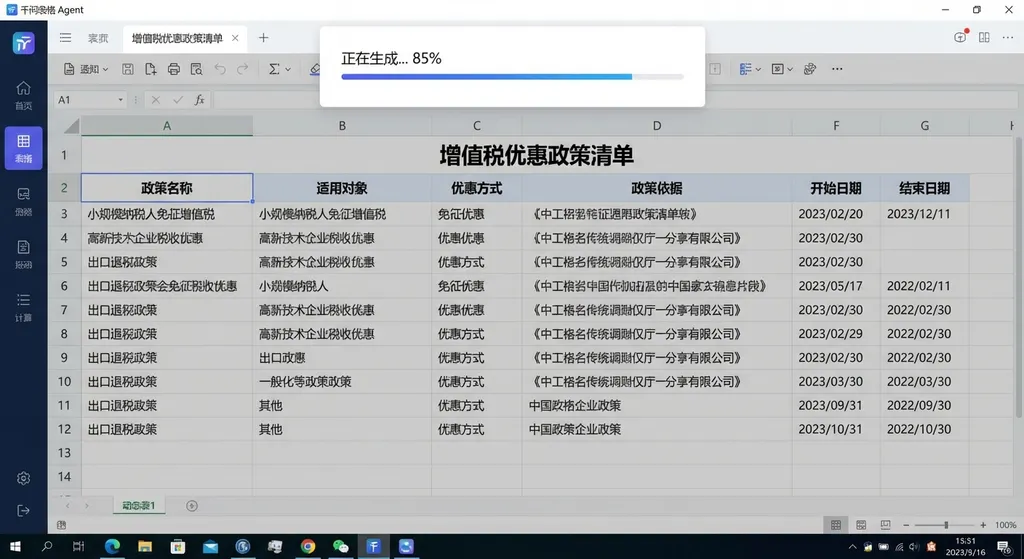
This “ready-to-use” experience is a quantum leap in efficiency for roles that frequently handle spreadsheets, such as finance, operations, and HR. In the past, year-end reimbursement processing meant manually checking hundreds of invoices, entering data into Excel, and worrying about errors. Now, you can just drag all invoices into Qwen and say “Generate an annual reimbursement ledger.” Within minutes, you’ll get a standardized, clearly structured table.
Three Core Scenarios: Retrieval, Conversational Organization, and Multimodal Input
Qwen Form Agent covers three main use cases:
1. Information Retrieval and Table Generation
This is the most straightforward use. You can ask Qwen to gather information and organize it into a table. For example: “Create an Excel sheet summarizing junior high English sentence structures and tense changes for easy print review.” Qwen will automatically retrieve grammar points and organize them by sentence pattern, tense, and examples.
The key here is that Qwen interprets your intent (e.g., “easy to print and memorize”) and automatically adjusts table structure and formatting.
2. Organizing Multi-Turn Conversations
A highly practical feature. You can have a detailed chat with Qwen about a complex topic — such as planning a trip, discussing destinations, transportation, lodging budget, and attractions. After the chat, simply say, “Turn our discussion into an Excel itinerary.” Qwen will extract key information and generate a structured table with columns like date, location, transport, lodging, budget, and notes.
This solves the common pain point of “information scattered across chats.” You no longer need to manually go through chat logs copying and pasting. Qwen understands the multi-turn context and automatically completes extraction and structuring.
3. Multimodal Input: Images and Files Recognized Effortlessly
Qwen Form Agent supports uploading PDFs, Word, and PPT files, as well as photos—it can accurately recognize hand-drawn timetables, payslips, and printed reports, then generate structured tables.
For existing Excel or CSV files, Qwen can analyze and edit based on user instructions. For instance:
- “Rank sales staff by sales revenue.”
- “Calculate visits based on deals and conversion rate.”
- “Center align the data in the third column.”
You don’t need to know Excel functions or VBA — just describe your needs in natural language.
Implementation: Agent Execution Pipeline + Sandbox Coding Environment
The technology behind Qwen Form Agent is worth noting. It doesn’t rely on simple templates but instead decomposes table generation into a comprehensive Agent execution chain:
- Task Planning – The system determines whether code writing or data retrieval is needed, and what fields are required.
- Information Retrieval – If data is insufficient, it triggers online search to supplement it.
- Code Generation – Coding occurs in an isolated sandbox, generating professional Excel files with real formulas, conditional formatting, and complex data logic.
- Execution & Output – Executes each operation step-by-step, finally outputting a downloadable
.xlsxfile.
The core lies in Qwen’s coding capability. Qwen can dynamically construct tools, understand complex spreadsheet logic, and execute code securely in a controlled environment. This is why Qwen can produce professional Excel files with formulas and formatting — not just data text.
From a product perspective, Qwen aims to evolve AI from “providing answers” to “delivering usable results.” This approach is reflected in other Qwen features as well—such as the Office suite launched in December 2023 (which generates formatted Word and PPT documents) and the January release integrating Taobao, Alipay, Fliggy, and Amap to handle 400+ real-world tasks like ordering food and booking tickets.
For Developers: API Integration and Automation Scenarios
For developers, Qwen Form Agent isn’t just a convenience feature — it represents a new interaction paradigm: performing complex, structured-data operations through natural language.
Though Qwen’s official API for the Form Agent hasn’t been released, the underlying functionality is built upon Qwen’s Function Calling and Code Interpreter capabilities. Developers can replicate similar functions using the Qwen API.
For example, using OpenAI Hub (which supports Qwen and other major models with an OpenAI-compatible format):
import openai
import pandas as pd
from io import StringIO

# Configure OpenAI Hub
openai.api_base = "https://openai-hub.com/v1"
openai.api_key = "your-openai-hub-key"

def generate_excel_from_prompt(prompt):
    response = openai.ChatCompletion.create(
        model="qwen-max",  # use Qwen model
        messages=[
            {"role": "system", "content": "You are a data analysis assistant skilled at generating structured tables in CSV format based on user requirements."},
            {"role": "user", "content": prompt}
        ],
        temperature=0.7
    )

    # Extract generated CSV
    csv_content = response.choices[0].message.content

    # Convert to DataFrame and save as Excel
    df = pd.read_csv(StringIO(csv_content))
    df.to_excel("output.xlsx", index=False)

    return "output.xlsx"

# Example call
file_path = generate_excel_from_prompt(
    "Generate a table of 2024 quarterly sales data with columns: quarter, revenue, and growth rate."
)
print(f"Excel file generated: {file_path}")
This is just a simplified example. The actual Qwen Form Agent is far more complex—it handles multi-turn dialogue, multimodal input, web retrieval, and compound Excel logic (formulas, formatting, layouts). But the core concept remains: understand user intent, produce structured data, and output a usable file.
For automation scenarios requiring large-scale spreadsheet handling—like periodic financial report generation, multi-source data aggregation, or template-based data filling—this “natural language → structured output” ability dramatically simplifies development pipelines. You focus on describing requirements, and the model handles implementation.
Competitive Comparison: Ecosystem Integration as Core Advantage
Spreadsheet generation is not new—ChatGPT, Claude, and Ernie Bot all support simple table creation. However, most of these generate Markdown or CSV, leaving users to manually format it in Excel.
Qwen differs in two main ways:
- Direct Excel Output – It produces downloadable Excel files complete with formulas and formatting.
- Ecosystem Integration – Qwen can invoke Alibaba ecosystem services. For example, when generating e-commerce spreadsheets, it can pull product data from Taobao; when generating travel schedules, it can pull from Fliggy and Amap.
This kind of ecosystem synergy is hard to replicate in the short term. While OpenAI and Anthropic have strong models, they lack Alibaba’s rich service ecosystem. Domestic competitors (Baidu, ByteDance, Tencent) have their own ecosystems but still can’t match Alibaba’s data richness in commerce, local services, and travel.
Strategically, Qwen is transitioning from a “conversational AI” to a “task-oriented AI”. The 400+ task features launched in January (ordering food, shopping, booking flights), the Office suite, and now the Form Agent, all reinforce one message:
“AI isn’t just a chatbot — it’s here to get work done.”
And that’s the right direction. Users want an AI that does real work, not one that just talks. The value of Qwen Form Agent isn’t in how pretty its spreadsheets look, but in delivering complete, end-to-end outcomes—from understanding user needs and retrieving data to generating and editing ready-to-use files.
Limitations and Areas for Improvement
Of course, Qwen Form Agent isn’t perfect. Current user experience reveals some challenges:
- Generation Speed – Officially 1–2 minutes, but complex spreadsheets may take longer. Not ideal for time-sensitive scenarios (like live meetings).
- Formatting Precision – While natural-language editing is supported, detailed formatting (e.g., specific borders or conditional rules) may still require manual adjustment.
- Data Accuracy – When online retrieval is involved, accuracy depends on search quality. Incorrect results lead to incorrect spreadsheet data.
- File Size Limits – It’s unclear how well Qwen handles large-scale spreadsheets (tens of thousands of rows), which may hit performance limits.
These aren’t deal-breakers but do affect overall experience. Hopefully, the Qwen team will continue refining these areas.
Final Thoughts
The launch of Qwen Form Agent marks a shift in AI productivity tools—from “assistive generation” to “end-to-end delivery.” Users no longer need to switch between tools (AI → Excel → manual formatting → formula setup); instead, the entire workflow happens through one conversation interface.
This leap in experience stems from core technical advances: improved coding ability, multimodal understanding, and long-context reasoning in large models. Qwen may be first, but competitors will follow. We can expect many more “AI office” tools in the coming months.
For developers, this trend deserves attention. The “natural language → structured output” capability is useful beyond spreadsheet generation—it can be applied to config file creation, test data generation, API documentation, and database schema design. If your product involves structured data, consider integrating large-model capabilities to replace traditional form input or manual scripting.
Platforms like OpenAI Hub will become increasingly valuable as they allow developers to flexibly switch among leading models (Qwen, GPT, Claude, DeepSeek) under a unified API interface and domestic network environment.
To conclude:
In the end, AI competition won’t be about who has the biggest model or the highest benchmark score—it will be about who truly solves user problems. Qwen Form Agent takes a meaningful step in that direction, and this is just the beginning.
References
-
Alibaba Qwen launches Form Agent, supports generating and editing Excel files in conversation - IT Home
IT Home’s detailed coverage of Qwen Form Agent, including official introduction and use cases. -
Qwen launches Form Agent: Generate and edit Excel files directly in conversation - PingWest
PingWest’s quick news coverage on Qwen Form Agent.


