
All-API-Hub Major Refactor: Open-Source Tool Brings Order to Multi-Model Relay Management

The open-source browser extension **All-API-Hub** has undergone a large-scale refactor, expanding from **One API Hub** to include features such as automatic check-in, usage analysis, and channel synchronization. It helps developers manage all **New API** relay accounts from a single dashboard.
All-API-Hub Major Refactor: Open Source Tool Makes Multi-Model Proxy Management No Longer a Mess
Developers who have used New API series proxies know the pain: you’ve got seven or eight site accounts, have to log into each backend to check balances, switch tabs to copy API Keys, and rely on memory to compare model prices. That fragmented management pain point now has an open-source solution.
Developer qixing-jk recently made a large-scale refactor of All-API-Hub. This browser extension was originally developed based on One API Hub, but now its features go far beyond the original — not only viewing balances and copying keys, but also auto check-in, usage analysis, channel configuration sync, and even testing API availability directly from a web page. For self-hosted New API administrators, it also adds batch channel creation and model redirection management tools.
Solving Real Pain Points
Let’s start with the context. In the current AI ecosystem, aggregation proxies based on the New API series (one-api, Veloera, one-hub, done-hub, Sub2API, etc.) are growing in number. For cost and stability, developers often use several sites simultaneously. But each site’s backend differs, making management scattered:
- Want to see which site still has balance? Log into each one.
- Want to compare model prices across sites? Open multiple tabs and note them manually.
- Need to import API Keys into CherryStudio or Claude Code? Copy and paste a dozen times.
- Need to add channels in bulk to your self-hosted site? Fill each form manually.
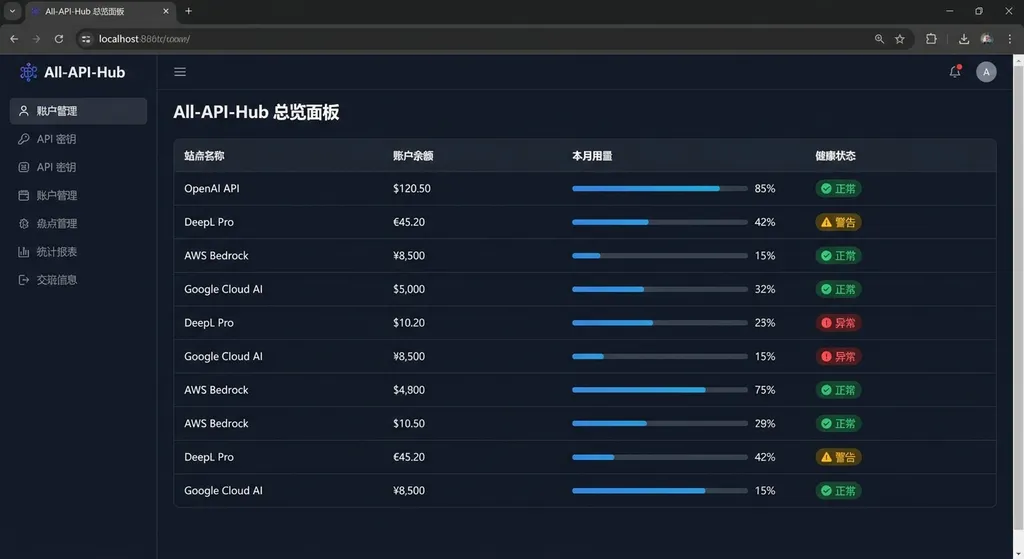
All-API-Hub consolidates all these actions into one extension panel. When adding an account, just paste the site address — it automatically detects site type, recharge ratio, and supported models. Afterwards, all accounts’ balances, usage, and health statuses appear on one dashboard, with auto-refresh support.
Core Capabilities After Refactor
The most noticeable change this time is feature depth. The original One API Hub mainly handled account aggregation and key management. Now All-API-Hub adds many practical features:
Auto Check-in – Many proxies reward daily sign-ins, but manual check-ins are easy to forget. The extension recognizes supported sites, lets you schedule auto check-ins, and logs execution records for troubleshooting.
Usage Analysis – Very handy for multi-account users. Filter and compare by site, account, token, or date to view usage, cost, model distribution, and trends. It also has latency and slow-request views, intuitive when diagnosing issues like “has a site recently slowed down?”
Model Validation – Test a key and model’s availability directly in the extension, with CLI compatibility checks. This solves a common problem: the site’s model list looks fine, but fails in Cursor or other tools. Now you can test in-browser without writing code.
Quick Export – One-click export to CherryStudio, CC Switch, CLIProxyAPI, Claude Code Router, and New API. Previously, you had to copy API Key, Base URL, and model list manually — now one click generates or imports config files.
Admin Tools: Channel and Model Management
For those running self-hosted New API, Veloera, or Octopus sites, All-API-Hub offers admin utilities.
One-Click Channel Creation – When adding upstream API channels in bulk, skip repetitive form entries. Import from config files or templates, and configure priority, weighting, retry policies, and more.
Model Sync – When upstream providers update model lists (e.g. OpenAI releases a new model), sync them to your site in one click — no manual additions. Supports model redirection, e.g. automatically routing gpt-4 requests to the cheaper gpt-4-turbo.
Channel Management – View all channels’ health, latency, and success rates to pinpoint faulty sources. Batch enable/disable channels or adjust load balancing strategies.
These features save administrators plenty of time — what used to require database updates or scripts now takes a few clicks in the extension.
Technical Implementation and Data Security
All-API-Hub is purely front-end; all data is stored locally in the browser and never uploaded to a server. For multi-device sync, you can optionally set up WebDAV backup.
It supports Chrome, Edge, and Firefox, and even works with the mobile Kiwi browser. The source code is open on GitHub for audit or modification. The data format is compatible with One API Hub, so you can import previous data directly.
When encountering Cloudflare challenges, a temporary window helps complete verification automatically, avoiding manual CAPTCHA handling — a well-polished detail.
Comparison With Competitors
There are many API key managers, but few target the New API series. One API Hub was the predecessor but offered only basic features. All-API-Hub keeps data compatibility while extending with deep features like usage analytics, auto check-in, and admin tools.
If you only manage a few API Keys, 1Password or Bitwarden work fine. But if you juggle multiple proxies, compare prices, analyze usage, and switch accounts frequently, All-API-Hub is far more integrated. Especially for self-hosted admins, features like channel sync and model redirection are essential.
Real Use Cases
Some typical scenarios:
Scenario 1: Cost Optimization – You’ve recharged $100 on Site A, while Site B offered a $50 bonus. You use Cursor for coding and want to consume Site B’s free credits first. All-API-Hub lets you see both sites’ balances and usage trends to decide which key to use.
Scenario 2: Fault Diagnosis – API calls slow down but you’re unsure which site is at fault. Open the usage analysis, sort by latency, and discover Site C’s average response time jumped from 2s to 10s. Switching to another site’s key fixes it.
Scenario 3: Bulk Configuration – You maintain an AI tool setup for a team and need to distribute new API Keys to 10 members. With All-API-Hub, export a config file and let members import — far quicker than manual copy-paste.
Scenario 4: Site Operation – You run a New API site connected upstream with OpenAI, Anthropic, and Google. When OpenAI releases GPT-5, you want to sync instantly. In All-API-Hub, click “Model Sync,” select the OpenAI channel, and the new model auto-adds to your site list.
Developer Community Feedback
The project has an active discussion thread on Linux.do with lots of feedback. Some noted “certain key settings require manual save,” meaning the extension deliberately distinguishes between auto and manual saves — critical configs must be explicitly confirmed to avoid mistakes.
GitHub stars are still modest, but browser store ratings are strong: 75 reviews averaging five stars. Given its niche audience of developers and site admins, that’s a solid track record.
Working With OpenAI Hub
If you use OpenAI Hub or similar aggregation platforms, All-API-Hub serves as a complement. OpenAI Hub solves “one key for all models,” while All-API-Hub solves “managing multiple proxy accounts.”
For example, you might have one main account on OpenAI Hub and several backups or test accounts on other proxies. All-API-Hub lets you monitor balances and usage across all of them and quickly export configurations when switching. They complement each other rather than overlap.
Suppose you’re building an AI app — use OpenAI Hub’s stable service for production and other proxies for development testing. All-API-Hub helps track remaining credits on test accounts and decide when to recharge or switch.
Installation and Usage
The extension is available on the Chrome Web Store, Edge Add-ons, and Firefox Add-ons. Search “All API Hub.”
To get the latest version or build it yourself, download the source from GitHub.
Safari users must compile it via Xcode due to Safari’s extension restrictions — not a project limitation.
When first using it, add a proxy site account: paste the site URL (e.g. https://api.example.com) and API Key, and the extension auto-detects site info. If detection fails, fill in name/type manually. You’ll then see balances, model lists, and usage in the dashboard.
Auto check-in must be enabled in settings, where you can set check-in time and notification mode. Usage analytics retains 30 days by default, adjustable in settings.
Sustainability of the Open Source Project
Maintaining such a tool is no small cost. The New API ecosystem evolves constantly, with each proxy implementation differing — the extension must continually adapt. Fortunately, it’s open source, allowing community code contributions and issue reports.
From the GitHub commit history, the author is actively maintaining it with frequent updates. Documentation is complete in both Chinese and English, with a detailed FAQ — a positive sign since many open-source projects fail due to poor docs or inactivity.
The project is non-commercial and collects no user data, driven solely by developer needs. That means no risk of sudden paywalls or shutdowns, but sustainability relies on the author’s enthusiasm and community support.
Who Should Use It
If you only use a single API provider or a couple of proxy accounts, All-API-Hub might be overkill. But if you:
- Use 3+ proxy accounts
- Need to compare pricing and availability across sites
- Frequently switch API setups between tools
- Host your own New API site with channel/model management
- Want to analyze API usage and costs
Then this tool can save significant time. Especially for site owners, channel management and model sync are must-haves — manual work is just too tedious.
Possible Future Directions
Feature-wise, All-API-Hub already covers most scenarios. Future expansions might include:
- Support for more proxy types (currently focused on New API series)
- More granular usage analysis (by model or application)
- Cost warnings and auto switching (when balance runs low)
- Team collaboration (shared configs, permission control)
- API call logging and debugging tools
However, each new feature adds complexity, so simplicity might remain more valuable than sheer functionality.
Summary
All-API-Hub directly addresses multi-account management pain points, particularly for the New API series proxies. The refactored version vastly improves depth — evolving from balance-checking to full usage analysis, auto check-ins, and channel management. For developers and admins alike, it’s a practical tool.
With open source, local storage, and cross-platform support, it’s competitive among similar tools. If you struggle managing multiple proxy accounts, it’s worth a try. The project remains actively developed, with more features on the horizon.
References
- All-API-Hub GitHub Repository – Source code & documentation
- All-API-Hub Discussion on Linux.do – Community feedback & usage experiences


