
Volcengine Coding Plan offers unlimited calls — what move is ByteDance making?

Volcengine Ark Coding Plan announces unlimited access with unchanged pricing, now supporting the latest models such as Doubao-Seed-2.0-Code and Kimi-K2.5, covering more than ten popular coding tools including Claude Code and Cursor.
Volcengine Ark Coding Plan recently rolled out an update that the developer community hailed as “bold and generous”: unlimited usage, unchanged pricing, plus support for the latest models.
This is not just a minor tweak. At a time when most AI coding subscription services charge by usage and impose rate limits, ByteDance’s product is taking a decidedly aggressive path — unlimited usage, locked pricing, always staying current with the newest models.
What exactly has been updated
Let’s start with the core changes.
Coding Plan was already a multi-model, multi-tool AI coding subscription service, but its usage quotas used to refresh periodically: limits every 5 hours, weekly, and monthly. With this update, the official positioning is now explicitly “unlimited.” Community users have confirmed this through actual usage — reports describe fast, smooth performance with no noticeable throttling.
As for pricing, both Lite and Pro plans remain unchanged. Given that the previous effective cost was roughly one-tenth of the direct API call price, removing usage limits pushes the cost-performance ratio even higher.
Model lineup now includes the latest:
- Doubao-Seed-2.0-Code (ByteDance proprietary)
- GLM-4.7 (Zhipu AI)
- DeepSeek-V3.2
- Kimi-K2.5 (Moonshot AI)
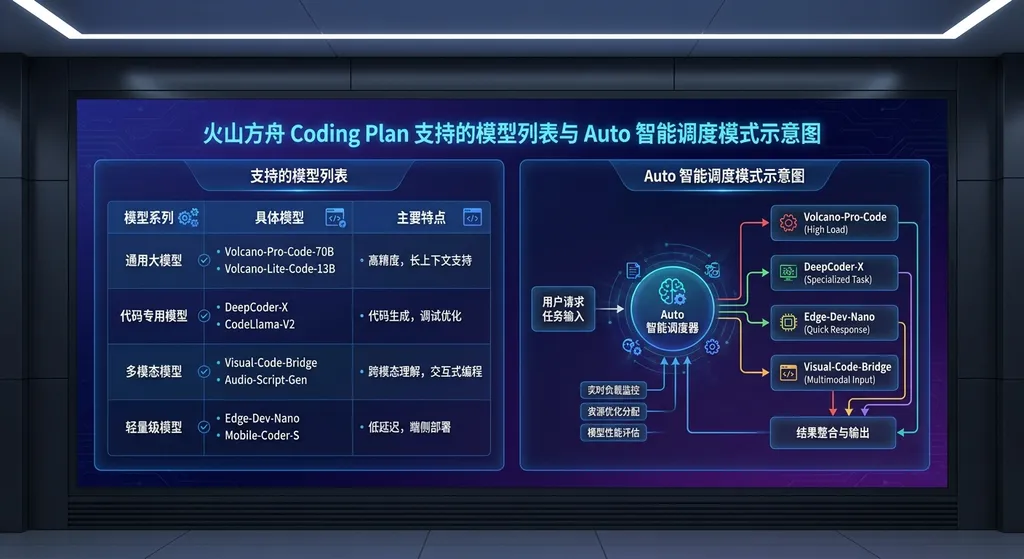
- and an Auto intelligent scheduling mode
The Auto mode deserves special mention. It’s not a random selection but rather a model-matching mechanism based on “effectiveness + speed.” Whether you’re building a front-end page or refactoring back-end code, the system dynamically dispatches different model combinations. For developers who don’t want to fuss over model choices, this could be the most worry-free option.
More than cheap — it’s about ecosystem positioning
At first glance, “unlimited + low price” looks like just a price war. But a closer look at the product design reveals ByteDance’s goal goes much deeper.
Coding Plan currently supports over ten coding tools: Claude Code, Cursor, Cline (VSCode plugin), OpenCode, Roo Code, Kilo Code, Aider, Codex CLI, and more — essentially covering today’s mainstream AI coding toolchain. Even better, your subscription quota is shared across all tools; no need to buy separate packages for each one.
What does that mean? You can start coding in Claude Code, switch to Cursor, then run a code review in Aider — and it all draws from the same quota. For developers frequently swapping between tools, this solves a real pain point: no more worrying about which tool has quota left or which subscription you should be using.
Even more crucial is protocol compatibility. Coding Plan supports both OpenAI and Anthropic protocols:
- For tools compatible with the OpenAI protocol, set Base URL to
https://ark.cn-beijing.volces.com/api/coding/v3 - For tools compatible with the Anthropic protocol, use Base URL
https://ark.cn-beijing.volces.com/api/coding
Together, these two protocols cover nearly all mainstream AI coding tools today. In other words, if your tool supports either protocol, it can connect to Coding Plan.
Essentially, ByteDance aims to become the “infrastructure layer” of the AI coding ecosystem. No matter what tool you use or which model you prefer, everything runs through Volcengine. It’s a classic platform play — attract developers with low prices and great experience, then retain them through ecosystem lock-in.
How does it compare to competitors
Plenty of domestic players now offer AI coding subscriptions, but most have issues: limited models, tool restrictions, or opaque pricing.
To give a direct comparison: if you call various model APIs directly — say DeepSeek-V3.2 or Kimi-K2.5 — your monthly cost for intensive development could easily be several times the price of Coding Plan Pro. Since Coding Plan bundles those models into one unlimited subscription, the cost advantage is obvious.
Compared with Cursor’s built-in subscription, Coding Plan differentiates itself by being tool-agnostic. Cursor Pro quota works only inside Cursor, whereas Coding Plan’s quota works across Claude Code, Cursor, Cline, Aider, and more. If you switch tools depending on task type, Coding Plan offers far greater flexibility.
Against overseas AI coding services, Coding Plan also has an important edge: direct domestic connectivity. No need to wrestle with network setups or instability — a huge plus for developers in China.
Of course, there are caveats. Coding Plan is intended for personal development. For enterprise-grade needs, the official advice is to use model API services directly. Also, quotas can only be consumed through AI coding tools — not for general API calls. Using its Base URL and API key in non-coding tools may count as abuse and result in subscription suspension or even account bans. So take care.
How simple is integration?
Now let’s look at the setup process.
Volcengine offers two configuration methods. The recommended way is via the Ark Helper automation tool (macOS & Linux). Just follow the wizard — select your plan, enter your API key, choose a model — click “Next” and you’re done.
If you prefer manual configuration, with Claude Code for example, you only need to set three environment variables:
export ANTHROPIC_BASE_URL=https://ark.cn-beijing.volces.com/api/coding
export ANTHROPIC_AUTH_TOKEN=your_Volcengine_Ark_API_Key
export ANTHROPIC_MODEL=ark-code-latest
After starting Claude Code, enter /status to check connection — if you see model info, setup succeeded.
For OpenAI-compatible tools like Aider:
export OPENAI_BASE_URL=https://ark.cn-beijing.volces.com/api/coding/v3
export OPENAI_API_KEY=your_Volcengine_Ark_API_Key
aider --model doubao-seed-2.0-code
Model switching is also flexible. You can switch in real time via /model <model_name> in the CLI, or set ark-code-latest and manage model changes in the Ark control console — updates take 3–5 minutes to take effect. The latter is ideal for those who don’t want to modify configs often.
Once you’re familiar with the process, setup takes about five minutes.
Auto intelligent scheduling — lazy mode or actually useful?
Auto mode is one easily overlooked yet worthwhile addition.
In a traditional AI coding workflow, developers must decide which model suits their current task — lightweight models for simple CRUD, heavier models for complex refactors. This manual decision-making adds cognitive load.
Auto mode addresses that. It automatically matches optimal model combinations based on task complexity and speed requirements — using fast models for simple jobs, powerful ones for difficult tasks.
From real-world experience, Auto mode performs well in most scenarios. It won’t waste time running heavy models for a simple loop, nor give you a lightweight model for hard refactoring. Occasionally, its judgment may be off, so if you have preferences, manual control remains safer.
For most developers, Auto is a good default option — convenient and effective.
Which plan to choose
The main difference between Lite and Pro is usage capacity and performance.
Lite targets moderate development — ideal for personal projects or learning. While marketed as unlimited, historical data shows its TPM (tokens per minute) configuration easily supports normal solo development pace.
Pro offers higher TPM and usage — designed for heavy users coding up to eight hours daily with frequent large-scale refactors. If you often run long reasoning chains, Pro’s higher TPM ensures no throttling during key operations.
A quick guideline:
If your AI-assisted coding time is under 2–3 hours per day, Lite is enough.
If you rely on AI coding all day, go straight for Pro.
Plans run monthly, starting on the purchase date. Quotas refresh automatically every 5 hours, week, and month — no extra charges when exhausted; just wait for the next cycle. This friendly design prevents awkward “quota used up too early” situations.
ByteDance’s ambition in AI coding
Viewed in the broader context, ByteDance’s AI coding strategy is becoming clear.
Doubao-Seed-2.0-Code is the foundation model, Coding Plan is the distribution channel, ArkClaw serves as the companion assistant, and OpenClaw enables one-click deployment. From models to tools to platform, ByteDance is building a full AI coding ecosystem.
The “unlimited usage” move essentially trades short-term cost for long-term developer mindshare. Once developers get comfortable coding within Volcengine’s environment, switching becomes harder — similar to how cloud vendors once attracted developers with free credits.
For developers, that’s good news. The fiercer the competition, the better and cheaper the services we get.
Still, it’s wise to stay realistic: how long “unlimited” lasts depends on how much ByteDance is willing to spend in this race. So far, their commitment looks strong, but markets shift quickly. The pragmatic approach — use it as much as you can while the advantage lasts.
A note: If your development needs go beyond coding assistance and require direct API calls within your own apps, Coding Plan may not fit — quotas only apply inside coding tools. For that, check platforms like OpenAI Hub, an API aggregation service offering multi-model access via one key and direct domestic connection. Same idea, different scenario.
Final thoughts
The AI Coding subscription track has been heating up since the second half of 2025 and is now a red ocean. Volcengine’s choice to play the “unlimited” card at this moment shows both confidence in its compute & model capabilities and a deliberate move to capture market share.
For developers, evaluation is straightforward: how much do you currently spend on AI-assisted coding each month? If Coding Plan gives equal or better performance for less money, it’s worth trying.
Judging by current community feedback, this update is well received.
Now, let the code speak.
References:
- Volcengine’s big move — Linux.do community discussion — Developer community’s conversation and feedback on Coding Plan’s unlimited update


