
Weibo Opens 70+ APIs: weibo-cli Allows Agents to Directly Operate Social Platforms
Weibo Open Platform has launched the official CLI tool **weibo-cli**, which wraps over 70 API endpoints, natively supports the MCP protocol, and enables AI Agents to directly post on Weibo, grab trending topics, and manage interactions. Developers can finally play around with Weibo via the command line.
Weibo has finally figured it out.
On June 22, the Weibo Open Platform quietly launched a command-line tool called weibo-cli. Simply put, it packages Weibo’s 70+ API endpoints into terminal commands, so developers can post Weibo updates, check trending topics, and manage comments with just a few lines of code. More importantly, it natively supports the MCP protocol — meaning AI Agents can directly use Weibo as a callable tool.
For developers working on social media automation, public opinion monitoring, and marketing tools, this might be one of the most practical platform opening moves in China this year.
Why This Matters
The degree of API openness among mainstream domestic social platforms has always been a major pain point. WeChat is almost completely closed. Douyin’s platform has heavy restrictions. Xiaohongshu doesn’t even have official APIs. Compared to these, Weibo has had an Open Platform for a long time, but the experience has been… let’s just say unpleasant: scattered documentation, complex authentication flows, outdated SDKs.
Many developers who want to do simple Weibo data scraping eventually resort to reverse-engineering and crawling — time-consuming, costly, and risky for account bans.
weibo-cli marks a significant step forward for Weibo in improving developer experience. It solves three core pain points:
First, simplified authentication into a single command. Previously, just going through OAuth for Weibo’s API was enough to deter half the people. Now, just run weibo-cli auth login, scan a code from the browser pop-up, and you’re done. Running on a server? Add a --device parameter for device code authentication.
Second, clear command structure, minimal onboarding cost. All commands follow a <group> <action> pattern. Want hot search? weibo-cli search trending. Want to post? weibo-cli statuses create. Want batch user lookup? weibo-cli users show_batch. Don’t guess parameters — just run --help.
Third, machine-friendly output formats. Supports JSON, YAML, table, and raw data outputs. For building data pipelines, this is crucial — scraped data can be fed directly into jq for processing or fed into an Agent’s context.
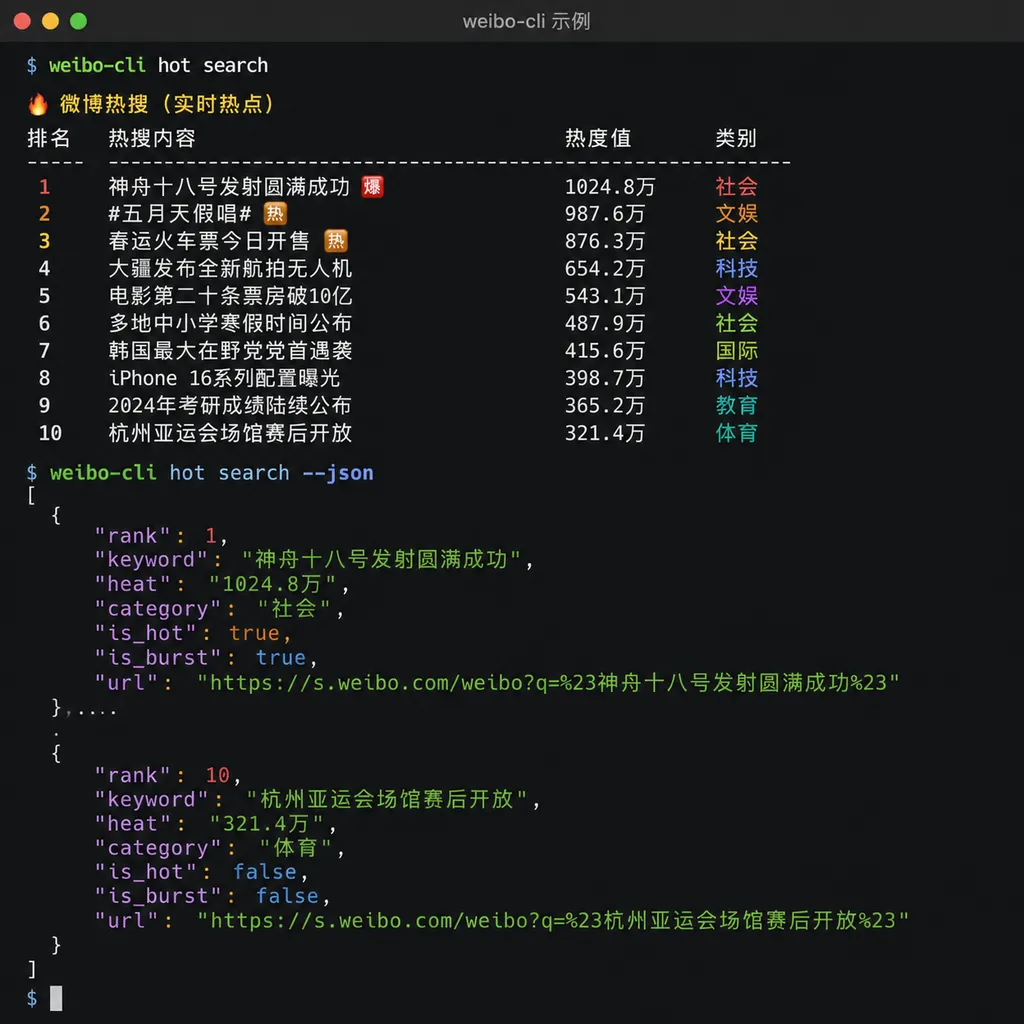
Native AI Agent Support: The Real Highlight
If it were just API wrapped into CLI, weibo-cli would be merely handy. What really opens possibilities is its native MCP protocol support.
MCP (Model Context Protocol) is proposed by Anthropic to let AI Agents call external tools. In short — Agents can “use” various services in a standardized way without writing custom adapter code for each one.
weibo-cli has a built-in MCP compatibility layer, meaning:
- Models like Claude and GPT that support function calling can directly treat Weibo operations as available tools.
- Agents built on LangChain, AutoGPT frameworks can plug in Weibo capabilities instantly.
- No need to wrap APIs yourself — tool descriptions and parameter validation are already handled.
Example: You build a public opinion monitoring Agent that checks Weibo trending topics every hour for mentions related to your brand, and automatically posts responses if any are found. Before: you’d write lots of glue code. Now: Agent just calls weibo-cli search trending and weibo-cli statuses create.
The official docs provide a typical Agent workflow example:
# 1. Fetch live trending topics, filter by keywords
weibo-cli search trending --output json \
  | jq '[.[] | select(.keyword | contains(\"护肤\"))]' > trending.json

# 2. Extract the keyword of the first topic
KEYWORD=$(jq -r '.[0].keyword' trending.json)

# 3. Search related Weibo posts
weibo-cli search keyword --query \"$KEYWORD\" \
  --limit 30 --output json > posts.json

# 4. Pass content to LLM for summarization
cat posts.json | llm-cli summarize \
  --prompt \"Summarize these Weibo posts’ core viewpoints within 200 characters\"
This pipeline-based workflow is exactly the right way to use CLI tools.
Feature Coverage: More Comprehensive Than Expected
weibo-cli wraps 70+ APIs, covering Weibo Open Platform’s main capability modules. Let me break them down by usage scenario:
Content Publishing
Most people care about this the most. Supports:
- Text-only Weibo posts
- Image-text posts (multiple images)
- Video Weibo posts
- Long Weibo / headline articles
Command examples:
# Post text-only
weibo-cli statuses create --text "This is a test post"

# Post with image (upload first to get media_id)
weibo-cli media upload --file ./photo.jpg --output json
# Returns {"media_id": "xxxxx"}
weibo-cli statuses create --text "Image post" --media_ids "xxxxx"

# Post to specified topic
weibo-cli statuses create --text "#TechNews# This is a topic-tagged post"
Note: publishing requires certain account permissions. Basic dev accounts may only post to their own account. Delegated posting service requires higher-level permissions.
Data Retrieval
Core for analytics/public opinion monitoring:
# Search Weibo by keyword
weibo-cli search keyword --query "iPhone" --count 50 --output json

# Search users
weibo-cli search users --query "Tech blogger" --count 20

# Get real-time trending list
weibo-cli search trending --output table

# Get heat trend for a topic
weibo-cli topics show --topic "Artificial Intelligence" --output json
Flexible output formats: --output table for humans, --output json for programs, --output csv for Excel.
Interaction Management
Supports comments, reposts, likes:
# Get comments for a post
weibo-cli comments show --id WeiboID --count 100

# Post a comment
weibo-cli comments create --id WeiboID --comment "Comment text"

# Repost
weibo-cli statuses repost --id WeiboID --status "Repost text"

# Get followers list
weibo-cli friendships followers --count 200
For community management teams, these can power automated reply systems — e.g., detect keywords in comments and reply with standard answers.
User Data
# View current logged-in account info
weibo-cli me --output table

# Batch query users by nickname
weibo-cli users show_batch --screen_names "UserA,UserB,UserC"

# Get followers profile data
weibo-cli users followers_profile --uid UserID
Follower profile data is valuable for KOL analysis and ad targeting — previously only accessible via third-party tools or manual page scraping.
Marketing Tools
Weibo’s commercialization abilities are also wrapped:
# Create lottery campaign
weibo-cli lottery create --text "Share to win" --prize "Prize description" --winner_count 3

# View lottery results
weibo-cli lottery result --id CampaignID
For brand marketing teams, the entire flow — creation, draw, notifying winners — can be automated.
Pricing Model: Credits Subscription
weibo-cli isn’t completely free — uses Credits subscription model. Officially offers five tiers:
| Plan | Credits | Price | Scenario | |------|---------|-------|----------| | Free | Trial quota | Free 7 days | Evaluation | | Basic | 3,000 | ¥29/month | Individual developer | | Pro | 15,000 | ¥99/month | Small team | | Business | 50,000 | ¥299/month | Medium enterprise | | Ultra | 200,000 | ¥999/month | Large-scale use |
Free plan restrictions: only your own Weibo data, basic endpoints limited to 5 calls/hour. For real dev work, start with Basic.
Different endpoints consume different Credits — query endpoints are cheaper, publish endpoints cost more (typical API pricing). Use weibo-cli commands show <command> for specifics.
Honestly, this pricing is standard for domestic APIs — similar to Qiniu image processing or Alibaba Cloud NLP.
Install & Authentication: 5 Minutes to Start
Built with Node.js v18+. Install in one line:
npm install -g @weibo-ai/weibo-cli
Or use official script (for environments without npm):
curl -fsSL https://open.weibo.com/cli/install.sh | bash
First step after install: login/authenticate:
# Desktop: opens browser for scan
weibo-cli auth login

# Server/SSH: device code auth
weibo-cli auth login --device
Credentials are stored in ~/.config/weibo-cli/credential.json. Check login status with:
$ weibo-cli auth whoami
✓ Logged in: @YourNickname
  UID: 1234567890
  Plan: Basic
  Credits remaining: 2,847
Authentication can reuse browser cookies if already logged in — handy for debugging, though OAuth is recommended for production.
Comparing Similar Tools: Official Status is the Big Advantage
Many Weibo scraping tools exist — search “weibo” on GitHub. weibo-cli’s core advantage: official product:
Compliance: Official API — no account bans, legal source. Crucial for enterprises; many internal audits forbid crawlers.
Stability: Third-party tools rely on reverse-engineered endpoints — break when Weibo changes. Official API has stability guarantees.
Complete functionality: Publish/interaction “write” operations aren’t possible with crawlers; official API covers more.
Drawbacks: must follow platform rules — some data (private posts, DMs) unavailable. Also costs money.
Free open-source tools may suffice for small personal projects, but for enterprise-level or long-running services, weibo-cli is more reliable.
Example Use Cases
1. Public Opinion Monitoring System
Brands fear negative opinion spread. Use weibo-cli to build a monitoring flow:
#!/bin/bash
# Runs every 30 minutes

# Search latest brand-related posts
weibo-cli search keyword --query "BrandName" --count 100 --output json > /tmp/mentions.json

# Run sentiment analysis
cat /tmp/mentions.json | sentiment-analyzer > /tmp/analysis.json

# If negatives found, send alert
jq '.[] | select(.sentiment == "negative")' /tmp/analysis.json | alert-sender
With cron jobs, a basic monitoring system is up.
2. Automated Content Distribution
Self-media operators often manage multiple accounts — content distribution is tedious. Script:
CONTENT=$(cat today_post.txt)

for account in account1 account2 account3; do
    weibo-cli auth switch --profile $account
    weibo-cli statuses create --text "$CONTENT"
    sleep 60  # avoid risk control
done
3. KOL Data Analysis
For MCNs or brands to evaluate KOL’s influence:
# Basic KOL data
weibo-cli users show --screen_name "KOLNickname" --output json > kol_profile.json

# Latest 100 posts interactions
weibo-cli statuses user_timeline --screen_name "KOLNickname" --count 100 --output json > kol_posts.json

# Calculate average interaction rate
jq '[.[].reposts_count + .[].comments_count + .[].attitudes_count] | add / length' kol_posts.json
4. AI Agent Integration
Imagine an intelligent customer service Agent:
- Monitor brand account comments & messages
- Identify question types
- Auto-generate replies
- Call
weibo-clito send them
Fully automated — humans only handle complex cases.
Usage Tips
After days of use, here are some tips:
1. Use --output json with jq:
jq is a JSON-processing powerhouse. For example, extract post text:
weibo-cli search keyword --query "AI" --output json | jq '.[].text'
2. Mind rate limits: Even paid plans have limits. Add delays for bulk ops to avoid bans.
3. Keep credentials safe:
credential.json holds your login credentials — don’t commit to Git repos. Add ~/.config/weibo-cli/ to global .gitignore.
4. Use dedicated accounts in production:
Don’t risk your main account on automation — risk control might restrict it.
Conclusion
weibo-cli’s release marks Weibo finally taking developer ecosystem seriously. 70+ APIs, native MCP support, reasonable pricing — lowering barriers to access.
For AI app developers, this might be the easiest domestic social media platform to integrate right now. When your Agent needs to “post to Weibo” or “check trending topics,” there’s finally a proper channel.
Of course, tools are just tools — creative usage depends on developers. If you’re working on social media projects, try it out. The Free plan’s 7-day trial is enough to test whether it fits your needs.
References
- ITHome: Weibo CLI Tool Officially Launched, Built for Developers and AI Agents — News coverage including pricing details
- Juejin: Weibo Open Platform Official CLI Is Now Open Source — Technical breakdown with command examples and Agent integration plans
- GitHub: weibo-cli — Open source repository with full documentation and usage examples


